- Index[Home]
- Overview / Features
What Is MusicBox.NET
Features
System Requirement
Keyboard And Mouse Commands - Main Window
Components
Menu Bar - Menu Options
File
View
Tools
Help - Windows
Visualization
Playlist
Music Information
Lyrics
Tracker
Wave Graph
Language
Mixer
Tags Editor
Console - Playlist
Add / Remove Items
Add From URL
Add From Folder
Save Playlist
Load Playlist - Repeat
Repeat
Repeat Playlist - Language
Installing Languages
Creating Languages - Mixer
Using Mixer - Tags Editor
Saving Tags - Console
Console Commands - Misc.
GNU General Public License V3
Credits
Changelog
Web Links
MusicBox.NET Main Window Components
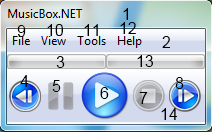
- Title Bar - shows song length and position.
- Menu Bar - contains "File", "View", "Tools" and "Help".
- Left Progress Bar - shows volume on the left speaker.
- Previous Button - switch to the previous song in the playlist.
- Pause Button - temporary stops the current playing audio.
- Play Button - plays and resume the paused audio.
- Stops Button - stops the current playing audio and reset its position.
- Next Button - switch to the next song in the playlist.
- File - contains important functions such as "Add", "Add From URL", etc.
- View - contains optional functions such as "Visualizations", "Repeat", etc.
- Tools - contains editing tools such as "Tags Editor", "Playlist Tool", "Console", etc.
- Help - contains support and information about the program.
- Right Progress Bar - shows the volume on the right speaker.
- Tool Bar - contains playing functions such as "Play", "Pause", "Stop", etc.